Overview of Creo Object TOOLKIT Java
This section provides an overview of Creo Object TOOLKIT Java.
Setting Up Object TOOLKIT Java
Object TOOLKIT is a Creo 3.0 object-based Java toolkit API.
Installing Creo Object TOOLKIT Java
Creo Object TOOLKIT Java is available on the same CD as Creo. When Creo application is installed, one of the optional components is API Toolkits. This includes Creo TOOLKIT, Creo Object TOOLKIT C++, Creo Object TOOLKIT Java and J-Link so on.
When you select the option Creo Object TOOLKIT Java and Jlink, both Creo Object TOOLKIT Java and J-Link are installed.
Note
J-Link is not available as a separate installation in the product CD.
The following Creo Object TOOLKIT Java directories are created under the Creo loadpoint. Creo Object TOOLKIT Java is automatically installed in these directories:
•  <creo_loadpoint>\<version>\Common Files\otk\otk_java—Contains all the libraries and example applications specific to Creo Object TOOLKIT Java.
•  <creo_loadpoint>\<version>\Common Files\otk_java_doc—Contains documentation files specific to Creo Object TOOLKIT Java.
•  <creo_loadpoint>\<version>\Common Files\otk_java_free—Contains all the example applications specific to J-Link.
Refer to the section Installing and Working with J-Link, for information on J-Link installation.
Licensing for Creo Object TOOLKIT Java
Creo Object TOOLKIT Java requires the development license to develop and unlock the Creo Object TOOLKIT Java application, and the runtime license to run the application.
To develop and test the Creo Object TOOLKIT Java application, you must have the Creo Object TOOLKIT Java development license. Customers who already have the Creo TOOLKIT license can alternately use the Creo Object TOOLKIT Java extension license with Creo TOOLKIT license.
The Creo Object TOOLKIT Java runtime license is required to run an unlocked Creo Object TOOLKIT Java application.
From Creo Object TOOLKIT Java 4.0 F000 onward, advanced licensing is supported. TOOLKIT-for-3D_Drawings is a advanced license. Certain methods are available under the 222 license option. Methods that require license 222 have the comment “LICENSE: 222” added in the APIWizard.
Note
If you have only the Creo Object TOOLKIT Java extension license and your application has methods available under license 222, then the manifest file must have information about the 222 license. If the license information is not present in the manifest file, and you run the application, exception is thrown for the licensed methods. For example, the manifest file must contain the following line:
PTC_LICENSE_222: 1
Unlocking, Running, and Signing the Creo Object TOOLKIT Java Application
Before you distribute your application executable to the end user, you must unlock it.
To unlock a Creo Object TOOLKIT Java application, you must have either of the following licenses:
•  Creo Object TOOLKIT Java development license, or
•  Creo Object TOOLKIT Java extension license along with Creo TOOLKIT license to be present and unused on your license server
To unlock your application, enter the following command:
<creo_loadpoint>/<app_name>/bin/protk_unlock.bat [-java] [<classname> 
<jarpath> <one or more pairs of class name and path to jar files>
where, <app_name>Parametric for Creo Parametric.
You can provide more than one Creo TOOLKIT binary file on the command line.
Note
Once you have unlocked the executable, you can distribute your application program to Creo Object TOOLKIT Java users in accordance with the license agreement.
If the Creo Parametric license server is configured to add a Creo TOOLKIT license as a startup option, protk_unlock.bat will cause the license server to hold only the Creo TOOLKIT option for 15 minutes. The license will not be available for any other development activity or unlocking during this period.
If the only available Creo TOOLKIT license is locked to a Creo Parametric license, the entire Creo Parametric license including the Creo TOOLKIT option will be held for 15 minutes. PTC recommends you configure your Creo TOOLKIT license option as a startup option to avoid tying up your Creo Parametric licenses.
Note
Only one license will be held for the specified time period, even if multiple applications were successfully unlocked.
Unlocking the application may also require one or more advanced licensing options. Your Creo Object TOOLKIT Java application may have calls to methods, which require one or more advanced licensing options. The protk_unlock application will detect whether any functions using advanced licenses are in use in the application, and if so, will make a check for the availability of the advanced license option. If that option is not present, unlocking will not be permitted. If they are present, the unlock will proceed. Advanced options are not held on the license server for any length of time. Refer to the section Advanced Licensing Options, for more information.
If the required licenses are available, the protk_unlock.bat application will unlock the Creo Object TOOLKIT Java application immediately.
Note
Once an application binary has been unlocked, it should not be modified in any way (which includes statically linking the unlocked binary with other libraries after the unlock). The unlocked binary must not be changed or else Creo Parametric will again consider it "locked".
You require any of the following licenses to be present and unused on your license server to run an unlocked Creo Object TOOLKIT Java application:
•  Creo Object TOOLKIT Java runtime license, or
•  Creo Object TOOLKIT Java development license, or
•  Both Creo Object TOOLKIT Java extension license and Creo TOOLKIT license
Note
If a Creo Object TOOLKIT Java code has multi-byte characters, then save the file in UTF-8 without BOM encoding format. Use the option encoding UTF-8 with the javac compiler to build class files.
During the unlocking process, PTC’s digital signature is added to the unlocked Creo Object TOOLKIT Java application. You can also sign your Creo Object TOOLKIT Java applications using the standard Java utility jarsigner. Please refer to the Oracle documentation for more information on this utility.
Unlock Messages
The following table lists the messages that can be returned when you unlock a Creo Object TOOLKIT Java application.
Message
Cause
<application name>:Successfully unlocked application.
The application is unlocked successfully.
Usage: protk_unlock.bat <one or more Creo TOOLKIT executables or DLLs>
No arguments supplied.
<application name>:ERROR: No READ access
<application name>:ERROR: No WRITE access
You do not have READ/WRITE access for the executable.
<application name>:Executable is not a Creo Object TOOLKIT Java application.
The executable is not linked with the Creo Object TOOLKIT Java libraries, or does not use any methods from those libraries.
<application name>:Executable is already unlocked.
The executable is already unlocked.
Error: Licenses do not contain Creo TOOLKIT License Code.
A requirement for unlocking a Creo Object TOOLKIT Java application.
ERROR: No Creo Parametric licenses are available for the startup command specified
Could not contact the license server.
<application name>:Unlocking this application requires option TOOLKIT-for-3D_Drawings.
The application uses methods that require an advanced option; and this option is not available.
The license option 222, that is, the TOOLKIT-for-3D_Drawings license is not available.
<application name>:Unlocking this application requires option TOOLKIT-for-Mechanica.
The application uses methods that require an advanced option; and this option is not available.
Class Types
Creo Object TOOLKIT Java is made up of a number classes in many packages. The following are the eight main classes.
•  Creo-Related Interfaces—Contain unique methods and attributes that are directly related to the functions in the Creo application. See the section Creo-Related Interfaces for additional information.
•  Compact Data Classes—Classes containing data needed as arguments to some Creo Object TOOLKIT Java methods. See the section Compact Data Classes for additional information.
•  Union Classes—A class with a potential for multiple types of values. See the section Unions for additional information.
•  Sequence Classes—Expandable arrays of objects or primitive data types. See the section Sequences for more information.
•  Array Classes—Arrays that are limited to a certain size. See the section Arrays for more information.
•  Enumeration Classes—Defines enumerated types. See the section Enumeration Classes for more information.
•  ActionListener Classes—Enables you to specify programs that will run only if certain events in the Creo application take place. See the section Action Listeners for more information.
•  Utility Classes—Contains static methods used to initialize certain Creo Object TOOLKIT Java objects. See the section Utilities for more information.
Each class shares specific rules regarding initialization, attributes, methods, inheritance, or exceptions. The following seven sections describe these classes in detail.
List of Classes and Methods
PTC provides a list of all the available Creo Object TOOLKIT Java classes and methods. The information is available in the file otk_methods.txt located at creo_otk_java_loadpoint_doc. The file is a tab delimited text file, which can be read in Microsoft Excel.
The file lists all the methods in the pfc and wfc interfaces along with their description. The file has the following fields:
•  Java Package, Java Class, and Java Method—Lists the Creo Object TOOLKIT Java packages, classes and methods.
•  Exposure—Specifies PMA if the method is supported in Creo Parametric. The field specifies PMA when the method is supported in Creo Parametric.
•  Description—Describes the class or method.
Creo-Related Interfaces
The Creo-related interfaces contain methods that directly manipulate objects in the Creo application. Examples of these objects include models, features, and parameters.
Initialization
You cannot construct one of these objects using the Java keyword new. Some objects that represent the Creo objects cannot be created directly but are returned by a Get or Create method.
For example, pfcSession.Session.GetCurrentModel returns a Model object set to the current model and pfcModelItem.ParameterOwner.CreateParam returns a newly created Parameter object for manipulation.
Attributes
Attributes within Creo-related objects are not directly accessible, but can be accessed through Get and Set methods. These methods are of the following types:
Attribute name: int XYZ
Methods:    int GetXYZ();
            void SetXYZ (int i);
Some attributes that have been designated as read can only be accessed by the Get method.
Methods
You must start Methods from the object in question and you must first initialize that object. For example, the following calls are illegal:
Window window;

window.Activate(); // The window has not yet been
                      initialized.

Repaint();         // There is no invoking object.
The following calls are legal:
WSession session = (WSession) pfcSession.Session.GetCurrentSession();
Window window = session.GetCurrentWindow();
       // You have initialized the window object.
window.Activate()
window.Repaint()
Inheritance
All Creo related objects are defined as interfaces so that they can inherit methods from other interfaces. To use these methods, call them directly (no casting is needed). For example:
public interface Feature
     extends jxobject,
     pfcModelItem.ParameterOwner,
     pfcObject.Parent,
     pfcObject.Object,
     pfcModelItem.ModelItem

Feature myfeature;           // Previously initialized

String name = myfeature.GetName();// GetName is in the
                                  // class ModelItem.
However, if you have a reverse situation, you need to explicitly cast the object. For example:
ModelItem item;  // You know this is a Feature -- perhaps
                 // you previously checked its type.
int number = ((Feature)item).GetNumber();
                 // GetNumber() is a Feature method. 
Exceptions
Almost every Creo Object TOOLKIT Java method can throw an exception of type com.ptc.cipjava.jxthrowable. Surround each method you use with a try-catch-finally block to handle any exceptions that are generated. See the Exceptions section for more information.
Compact Data Classes
Compact data classes are data-only classes. They are used, as needed, for arguments and return values for some Creo Object TOOLKIT Java methods. They do not represent actual objects in the Creo application.
Initialization
You can create instances of these classes using a static create method.
Example: pfcModel.BOMExportIntructions_Create()
This static method usually belongs to the utility class in the specific package that the compact data class belong to.
Attributes
Attributes within compact data related classes are not directly accessible, but can be accessed through Get and Set methods. These methods are of the following types:
Attribute name: int XYZ
Methods:    int GetXYZ();
            void SetXYZ (int i);
Methods
You must start Methods from the object in question and you must first initialize that object. For example, the following calls are illegal:
SelectionOptions options;

options.SetMaxNumSels(); // The object has not been
                      initialized.
SetOptionsKeywords(); // There is no invoking object
Inheritance
Compact objects can inherit methods from other compact interfaces. To use these methods, call them directly (no casting needed).
Exceptions
Almost every Creo Object TOOLKIT Java method can throw an exception of type com.ptc.cipjava.jxthrowable. Surround each method you use with a try-catch-finally block to handle any exceptions that are generated.
Unions
Unions are interface-like objects. Every union has a discriminator method with the pre-defined name Getdiscr(). This method returns a value identifying the type of data that the union objects holds. For each union member, a pair of (Get/Set) methods is used to access the different data types. It is illegal to call any Get method except the one that matches the value returned from Getdiscr(). However, any Set method can be called. This switches the discriminator to the new value.
The following is an example of a Creo Object TOOLKIT Java union:
class ParamValue
{
public:
    ParamValueType               Getdiscr ();
    String                       GetStringValue ();
    void                         SetStringValue (String value);
    int                          GetIntValue ();
    void                         SetIntValue (int value);
    boolean                      GetBoolValue ();
    void                         SetBoolValue (boolean value);
    double                       GetDoubleValue ();
    void                         SetDoubleValue (double value);
    int                          GetNoteId ();
    void                         SetNoteId (int value);
};
Sequences
Sequences are expandable arrays of primitive data types or objects in Creo Object TOOLKIT Java. All sequence classes have the same methods for adding to and accessing the array. Sequence classes are identified by a plural name, or the suffix seq.
Initialization
You cannot construct one of these objects using the Java keyword new. Static create methods for each list type are available. For example, pfcModel.Models.create() returns an empty Models sequence object for you to fill in.
Attributes
The attributes within sequence objects must be accessed using methods.
Methods
Sequence objects always contain the same methods: get, set, getarraysize, insert, insertseq, removerange, and create. Methods must be invoked from an initialized object of the correct type, except for the static create method, which is invoked from the sequence class.
Inheritance
Sequence classes do not inherit from any other Creo Object TOOLKIT Java classes. Therefore, you cannot cast sequence objects to any other type of Creo Object TOOLKIT Java object, including other sequences. For example, if you have a list of model items that happen to be features, you cannot make the following call:
Features features = (Features) modelitems;
To construct this array of features, you must insert each member of the list separately while casting it to a Feature.
Exceptions
If you try to get or remove an object beyond the last object in the sequence, the exception cipjava.XNoAttribute is thrown.
Example Code: Sequence Class
The following example code shows the sequence class com.ptc.pfc.pfcModel.Models.
package com.ptc.pfc.pfcModel;

public class Models extends jxobject_i
{
    public int getarraysize() throws jxthrowable
    public Model get (int idx) throws jxthrowable
    public void                     set (
        int                          idx,
        Model                        value
    ) throws jxthrowable

    public void                     removerange 
(
        int                          frominc,
        int                          toexcl
    ) throws jxthrowable

    public void                      insert 
(
        int                           atidx,
        Model                         value
    ) throws jxthrowable

    public void                     insertseq 
(
        int                             atidx,
        pfcModel.Models                 value
    ) throws jxthrowable

    public static pfcModel.Models   create() throws jxthrowable
}
Arrays
Arrays are groups of primitive types or objects of a specified size. An array can be one or two dimensional. The following array classes are in the pfcBase package: Matrix3D, Point2D, Point3D, Outline2D, Outline3D, UVVector, UVParams, Vector2D, and Vector3D. See the online reference documentation to determine the exact size of these arrays.
Initialization
You cannot construct one of these objects using the Java keyword new. Static creation methods are available for each array type. For example, the method pfcBase.Point2D.create returns an empty Point2D array object for you to fill in.
Attributes
The attributes within array objects must be accessed using methods.
Methods
Array objects always contain the same methods: get, set, and create. Methods must be invoked from an initialized object of the correct type, except for the create method, which is invoked from the name of the array class.
Inheritance
Array classes do not inherit from any other Creo Object TOOLKIT Java classes.
Exceptions
If you try to access an object that is not within the size of the array, the exception cipjava.XNoAttribute is thrown.
Example Code - Array Class
The following example code shows the array class com.ptc.pfc.pfcBase.Point2D.
    package com.ptc.pfc.pfcBase;
    
    public class Point2D extends jxobject_i
    {
        public double                   get (int idx0) throws jxthrowable
    
        public void                     set (
            int                             idx0,
            double                          value
        ) throws jxthrowable
    
        public static Point2D   create() throws jxthrowable
    };
Enumeration Classes
In Creo Object TOOLKIT Java, enumeration classes are used in the same way that an enum is used in C or C++. An enumeration class defines a limited number of static final instances which correspond to the members of the enumeration. Each static final instance has a corresponding static final integer constant. In the FeatureType enumeration class the static instance FEATTYPE_HOLE has as it’s integer equivalent _FEATTYPE_HOLE . Enumeration classes in Creo Object TOOLKIT Java generally have names of the form XYZType or XYZStatus.
Enumeration instances are passes whenever a method requires you to choose among multiple options. Use the integer constants where an int is required (such as cases in a switch statement).
Initialization
You cannot construct one of these objects. You simply use the name of the static instance or static integer constant.
Attributes
An enumeration class is made up of constant integer attributes and static instances of the enumerated class type. Related integers and instances have the same name, except the integer attribute begins with an underscore (_). The names of these attributes are all uppercase and describe what the attribute represents. For example:
•  PARAM_INTEGER—An instance of the ParamValueType enumeration class that is used to indicate that a parameter stores an integer value. The corresponding integer is _PARAM_INTEGER.
•  ITEM_FEATURE—An instance of the ModelItemType enumeration class that is used to indicate that a model item is a feature. The corresponding integer is_ ITEM_FEATURE.
An enumeration class always has an integer attribute named “__Last”, which is one more than the highest acceptable numerical value for that enumeration class.
Methods
Enumeration classes have one method that you are likely to use:
•  getValue—Returns the integer value of an enumeration instance.
Inheritance
Enumeration classes do not inherit from any other Creo Object TOOLKIT Java classes.
Exceptions
Enumeration classes do not throw exceptions.
Example Code: Enumeration Class
The following example code shows the enumeration class com.ptc.pfc.pfcBase.Placement.
package com.ptc.pfc.pfcBase;

public final class Placement
{
    public static final int _PLACE_INSIDE = 0;

    public static final Placement PLACE_INSIDE =
           new Placement (_PLACE_INSIDE);

    public static final int _PLACE_ON_BOUNDARY = 1;

    public static final Placement PLACE_ON_BOUNDARY =
           new Placement (_PLACE_ON_BOUNDARY);

    public static final int _PLACE_OUTSIDE = 2;

    public static final Placement PLACE_OUTSIDE =
           new Placement (_PLACE_OUTSIDE);

    public static final int __Last = 3;

    public static Placement FromInt (int value)

    public int getValue()
};
Action Listeners
Use ActionListeners in Creo Object TOOLKIT Java to assign programmed reactions to events that occur within the Creo application. Creo Object TOOLKIT Java defines a set of action listener interfaces that can be implemented enabling Creo application to call your Creo Object TOOLKIT Java application when specific events occur. These interfaces are designed to respond to events from action sources in Creo application. Examples of action sources include the session, user-interface commands, models, solids, parameters, and features.
Initialization
For each of its defined ActionListener interfaces, Creo Object TOOLKIT Java provides a corresponding default implementation class. For example, the SolidActionListener interface has a corresponding DefaultSolidActionListener implementation. All of the default action listener classes override every listener method with an empty method.
You must use the default implementation to construct applications. You cannot directly implement the SolidActionListener interface, as this interface will be missing the routing used internally by Creo Object TOOLKIT Java
You implement an action listener class by inheriting the appropriate default class and overriding the methods that respond to specific events. For the other events,Creo calls the empty methods inherited from the default class.
Construct your ActionListener classes using the Java keyword new. Then assign your ActionListener to an ActionSource using the AddActionListener() or pfcBase.ActionSource.AddActionListenerWithType method of the action source. When you use the method pfcBase.ActionSource.AddActionListenerWithType, you can choose to register only specific actions. These actions are specified in the ActionTypes array.
Attributes
Action listeners do not have any accessible attributes.
Methods
You must override the methods you need in the default class to create an ActionListener object correctly. The methods you create can call other methods in the ActionListener class or in other classes.
Inheritance
All Creo Object TOOLKIT Java ActionListener objects inherit from the interface pfcBase.ActionListener.
Exceptions
Action listeners cause methods to be called outside of your application start and stop methods. Therefore, you must include exception-handling code inside the ActionListener implementation if you want to respond to exceptions. In some methods called before an event, propagating an exception out of your method will cancel the impending event.
Example Code - Array Class
The following example code shows part of the SolidActionListener interface.
package com.ptc.pfc.pfcSolid;

public interface SolidActionListener extends
     jxobject,
     com.ptc.pfc.pfcBase.ActionListener
    
{
    void                            OnBeforeRegen 
(
        com.ptc.pfc.pfcSolid.Solid      Sld,
        com.ptc.pfc.pfcFeature.Feature  /* optional */ StartFeature
    ) throws jxthrowable;

    void                            OnAfterRegen (
        com.ptc.pfc.pfcSolid.Solid      Sld,
        com.ptc.pfc.pfcFeature.Feature  /* optional */ StartFeature,
        boolean                         WasSuccessful
    ) throws jxthrowable;

    void                            OnBeforeUnitConvert (
        com.ptc.pfc.pfcSolid.Solid      Sld,
        boolean                         ConvertNumbers
    ) throws jxthrowable;

    void                            OnAfterUnitConvert (
        com.ptc.pfc.pfcSolid.Solid      Sld,
        boolean                         ConvertNumbers
    ) throws jxthrowable;
};
Utilities
Each package in Creo Object TOOLKIT Java has one class that contains special static methods used to create and access some of the other classes in the package. These utility classes have the same name as the package, such as pfcModel.pfcModel.
Initialization
Because the utility packages have only static methods, you do not need to initialize them. Simply access the methods through the name of the class, as follows:
ParamValue pv = pfcModelItem.CreateStringParamValue ("my_param");
Attributes
Utilities do not have any accessible attributes.
Methods
Utilities contain only static methods used for initializing certain Creo Object TOOLKIT Java objects.
Inheritance
Utilities do not inherit from any other Creo Object TOOLKIT Java classes.
Exceptions
Methods in utilities can throw jxthrowable type exceptions.
Sample Utility Class
The following code example shows the utility class com.ptc.pfc.pfcGlobal.pfcGlobal.
package com.ptc.pfc.pfcGlobal;

public class pfcGlobal
{
public static pfcSession.Session GetCurrentSession()
    throws jxthrowable

public static stringseq GetProEArguments()
    throws jxthrowable

public static string GetProEVersion()
    throws jxthrowable

public static string GetProEBuildCode()
    throws jxthrowable
}
Creating Applications
The following sections describe how to create applications. The topics are as follows:
Importing Packages
To use pfc code in your application you must import the necessary packages. Import each class or package with a statement similar to the following:
For the Parameter class only:
import com.ptc.pfc.pfcModelItem.Parameter;
For the package pfcBase (all classes):
import com.ptc.pfc.pfcBase.*;
You might also need to import the methods in com.ptc.cipjava, which contains the underlying Creo Object TOOLKIT Java structure, including exceptions and certain sequences.. Use the following statement:
import com.ptc.cipjava.*;
Application Hierarchy
The rules of object orientation require a certain hierarchy of object creation when you start a Creo Object TOOLKIT Java application. The method invoked must be pfcSession.Session.GetCurrentSession, which returns a handle to the current session of the Creo application. To get the full scope of Creo Object TOOLKIT Java functionality, the application should cast the session object to WSession.
The application must iterate down to the level of object you want to access. For example, to list all the datum axes contained in the hole features in all models in session, do the following:
1. Get a handle to the session:
2. Get the models that are active in the session:
3. Get the feature model items in each model:
4. Filter out the features of type hole:
5. Get the subitems in each feature that are axes:
Exception Handling
Nearly all Creo Object TOOLKIT Java methods are declared as throwing the jxthrowable exception, as shown here in the declaration of Model.CreateLayer().
com.ptc.pfc.pfcLayer.Layer      CreateLayer (
    String                          Name
) throws jxthrowable;
In fact, the jxthrowable exception is never actually thrown. It is the parent class of all the exceptions that are thrown by Creo Object TOOLKIT Java methods and satisfies Java’s requirement that a method’s declaration include the exceptions that it throws.
Note
Exceptions thrown by Creo Object TOOLKIT Java methods are not documented in the Creo Object TOOLKIT Java User's Guide. Refer to the APIWizard for more information on method specific exceptions.
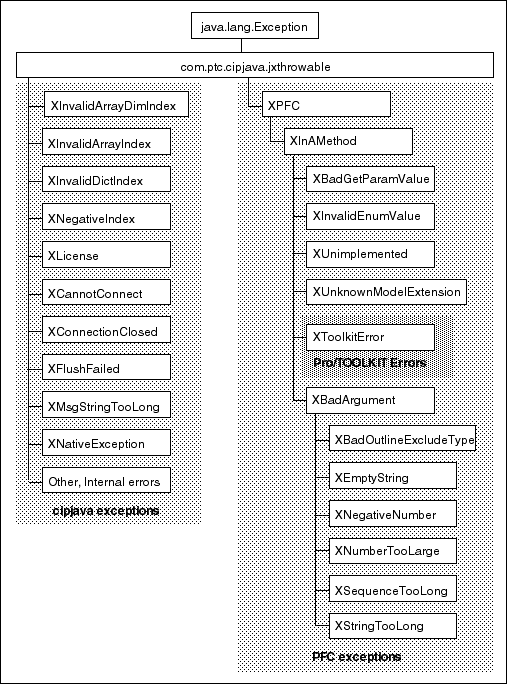
The following figure organizes the Creo Object TOOLKIT Java exceptions into three categories to facilitate the discussion that follows.
Creo Object TOOLKIT Java Exception Classes
Image
cipjava Exceptions
The cipjava exceptions are thrown by classes in the com.ptc.cipjava package. With the exception of the intseq, realseq, boolseq, and stringseq classes, these classes are only used internally.
The following table describes these exceptions.
Exception
Purpose
XInvalidArrayDimIndex, XInvalidArrayIndex, XInvalidDictIndex, XNegativeIndex
Illegal index value used when accessing a cipjava array, sequence, or dictionary. (The Creo Object TOOLKIT Java interface does not currently include any dictionary classes.)
XLicense
Licensing error (license does not exist, lost, server down, etc.)
XMsgStringTooLong
Communication synchronization problem between Creo and Creo Object TOOLKIT Java application. Restart the Creo Object TOOLKIT Java application.
XNativeException
Unknown exception occurred in another language. This usually signals a serious error (such as division by zero or class not found) that is related to the Creo Object TOOLKIT Java application.
XCannotConnect, XConnectionClosed, XFlushFailed
Communication problems between Creo and Creo Object TOOLKIT Java application.
Other, internal errors
Internal assertions that should not append and which need not be caught individually.
PFC/WFC Exceptions
The PFC/WFC exceptions are thrown by the classes that make up Creo Object TOOLKIT Java’s public interface. The following table describes these exceptions.
Exception
Purpose
XBadExternalData
An attempt to read contents of an external data object which has been terminated.
XBadGetArgValue
Indicates attempt to read the wrong type of data from the ArgValue union.
XBadGetExternalData
Indicates attempt to read the wrong type of data from the ExternalData union.
XBadGetParamValue
Indicates attempt to read the wrong type of data from the ParamValue union.
XBadOutlineExcludeType
Indicates an invalid type of item was passed to the outline calculation method.
XCancelProEAction
This exception type will not be thrown by Creo Object TOOLKIT Java methods, but you may instantiate and throw this from certain ActionListener methods to cancel the corresponding action in the Creo application.
XCannotAccess
The contents of a Creo Object TOOLKIT Java object cannot be accessed in this situation.
XEmptyString
An empty string was passed to a method that does not accept this type of input.
XInvalidEnumValue
Indicates an invalid value for a specified enumeration class.
XInvalidFileName
Indicates a file name passed to a method was incorrectly structured.
XInvalidFileType
Indicates a model descriptor contained an invalid file type for a requested operation.
XInvalidModelItem
Indicates that the item requested to be used is no longer usable (for example, it may have been deleted).
XInvalidSelection
Indicates that the Selection passed is invalid or is missing a needed piece of information. For example, its component path, drawing view, or parameters.
XJLinkApplicationException
Contains the details when an attempt to call code in an external Creo Object TOOLKIT Java application failed due to an exception.
XJLinkApplicationInactive
Unable to operate on the requested JLinkApplication object because it has been shut down.
XJLinkTaskExists
Indicates that a Creo Object TOOLKIT Java task with the given name already exists in session.
XJLinkTaskNotFound
Indicates that the Creo Object TOOLKIT Java task with the given name could not be found and run.
XMethodForbidden
Indicates that the specified method is not supported in the Creo environment..
XModelNotInSession
Indicates that the model is no longer in session; it may have been erased or deleted.
XNegativeNumber
Numeric argument was negative.
XNumberTooLarge
Numeric argument was too large.
XProEWasNotConnected
The Creo session is not available so the operation failed.
XSequenceTooLong
Sequence argument was too long.
XStringTooLong
String argument was too long.
XUnimplemented
Indicates unimplemented method.
XUnknownModelExtension
Indicates that a file extension does not match a known Creo model type.
Creo TOOLKIT Errors
The XToolkitError exception provides access to error codes from Creo TOOLKIT functions that Creo Object TOOLKIT Java uses internally and to the names of the functions returning such errors. XToolkitError is the exception you are most likely to encounter because Creo Object TOOLKIT Java is built on top of Creo TOOLKIT. The following table lists the integer values that can be returned by the XToolkitError.GetErrorCode() method and shows the corresponding Creo TOOLKIT constant that indicates the cause of the error. Each specific XToolkitError exception is represented by an appropriately named child class, allowing you to catch specific exceptions you need to handle separately.
XToolkitError Child Class
Creo TOOLKIT Error
#
XToolkitGeneralError
PRO_TK_GENERAL_ERROR
-1
XToolkitBadInputs
PRO_TK_BAD_INPUTS
-2
XToolkitUserAbort
PRO_TK_USER_ABORT
-3
XToolkitNotFound
PRO_TK_E_NOT_FOUND
-4
XToolkitFound
PRO_TK_E_FOUND
-5
XToolkitLineTooLong
PRO_TK_LINE_TOO_LONG
-6
XToolkitContinue
PRO_TK_CONTINUE
-7
XToolkitBadContext
PRO_TK_BAD_CONTEXT
-8
XToolkitNotImplemented
PRO_TK_NOT_IMPLEMENTED
-9
XToolkitOutOfMemory
PRO_TK_OUT_OF_MEMORY
-10
XToolkitCommError
PRO_TK_COMM_ERROR
-11
XToolkitNoChange
PRO_TK_NO_CHANGE
-12
XToolkitSuppressedParents
PRO_TK_SUPP_PARENTS
-13
XToolkitPickAbove
PRO_TK_PICK_ABOVE
-14
XToolkitInvalidDir
PRO_TK_INVALID_DIR
-15
XToolkitInvalidFile
PRO_TK_INVALID_FILE
-16
XToolkitCantWrite
PRO_TK_CANT_WRITE
-17
XToolkitInvalidType
PRO_TK_INVALID_TYPE
-18
XToolkitInvalidPtr
PRO_TK_INVALID_PTR
-19
XToolkitUnavailableSection
PRO_TK_UNAV_SEC
-20
XToolkitInvalidMatrix
PRO_TK_INVALID_MATRIX
-21
XToolkitInvalidName
PRO_TK_INVALID_NAME
-22
XToolkitNotExist
PRO_TK_NOT_EXIST
-23
XToolkitCantOpen
PRO_TK_CANT_OPEN
-24
XToolkitAbort
PRO_TK_ABORT
-25
XToolkitNotValid
PRO_TK_NOT_VALID
-26
XToolkitInvalidItem
PRO_TK_INVALID_ITEM
-27
XToolkitMsgNotFound
PRO_TK_MSG_NOT_FOUND
-28
XToolkitMsgNoTrans
PRO_TK_MSG_NO_TRANS
-29
XToolkitMsgFmtError
PRO_TK_MSG_FMT_ERROR
-30
XToolkitMsgUserQuit
PRO_TK_MSG_USER_QUIT
-31
XToolkitMsgTooLong
PRO_TK_MSG_TOO_LONG
-32
XToolkitCantAccess
PRO_TK_CANT_ACCESS
-33
XToolkitObsoleteFunc
PRO_TK_OBSOLETE_FUNC
-34
XToolkitNoCoordSystem
PRO_TK_NO_COORD_SYSTEM
-35
XToolkitAmbiguous
PRO_TK_E_AMBIGUOUS
-36
XToolkitDeadLock
PRO_TK_E_DEADLOCK
-37
XToolkitBusy
PRO_TK_E_BUSY
-38
XToolkitInUse
PRO_TK_E_IN_USE
-39
XToolkitNoLicense
PRO_TK_NO_LICENSE
-40
XToolkitBsplUnsuitableDegree
PRO_TK_BSPL_UNSUITABLE_DEGREE
-41
XToolkitBsplNonStdEndKnots
PRO_TK_BSPL_NON_STD_END_
KNOTS
-42
XToolkitBsplMultiInnerKnots
PRO_TK_BSPL_MULTI_INNER_KNOTS
-43
XToolkitBadSrfCrv
PRO_TK_BAD_SRF_CRV
-44
XToolkitEmpty
PRO_TK_EMPTY
-45
XToolkitBadDimAttach
PRO_TK_BAD_DIM_ATTACH
-46
XToolkitNotDisplayed
PRO_TK_NOT_DISPLAYED
-47
XToolkitCantModify
PRO_TK_CANT_MODIFY
-48
XToolkitCheckoutConflict
PRO_TK_CHECKOUT_CONFLICT
-49
XToolkitCreateViewBadSheet
PRO_TK_CRE_VIEW_BAD_
SHEET
-50
XToolkitCreateViewBadModel
PRO_TK_CRE_VIEW_BAD_
MODEL
-51
XToolkitCreateViewBadParent
PRO_TK_CRE_VIEW_BAD_PARENT
-52
XToolkitCreateViewBadType
PRO_TK_CRE_VIEW_BAD_TYPE
-53
XToolkitCreateViewBadExplode
PRO_TK_CRE_VIEW_BAD_EXPLODE
-54
XToolkitUnattachedFeats
PRO_TK_UNATTACHED_FEATS
-55
XToolkitRegenerateAgain
PRO_TK_REGEN_AGAIN
-56
XToolkitDrawingCreateErrors
PRO_TK_DWGCREATE_ERRORS
-57
XToolkitUnsupported
PRO_TK_UNSUPPORTED
-58
XToolkitNoPermission
PRO_TK_NO_PERMISSION
-59
XToolkitAuthenticationFailure
PRO_TK_AUTHENTICATION_FAILURE
-60
XToolkitMultibodyUnsupported
PRO_TK_MULTIBODY_UNSUPPORTED
-69
XToolkitAppNoLicense
PRO_TK_APP_NO_LICENSE
-92
XToolkitAppExcessCallbacks
PRO_TK_APP_XS_CALLBACKS
-93
XToolkitAppStartupFailed
PRO_TK_APP_STARTUP_FAIL
-94
XToolkitAppInitializationFailed
PRO_TK_APP_INIT_FAIL
-95
XToolkitAppVersionMismatch
PRO_TK_APP_VERSION_MISMATCH
-96
XToolkitAppCommunicationFailure
PRO_TK_APP_COMM_FAILURE
-97
XToolkitAppNewVersion
PRO_TK_APP_NEW_VERSION
-98
The exception XProdevError represents a general error that occurred while executing a Pro/DEVELOP function and is equivalent to an XZToolkit general Error. (PTC does not recommend the use of Pro/DEVELOP functions.)
The exception XExternalDataError and it’s children are thrown from External Data methods. See the chapter on External Data for more information.
Approaches to Creo Object TOOLKIT Java Exception Handling
To deal with the exceptions generated by Creo Object TOOLKIT Java methods surround each method with a try-catch-finally block. For example:
try {
    JLinkObject.DoSomething()
}
catch (jxthrowable x) {
    // Respond to the exception.
}
Rather than catching the generic exception, you can set up your code to respond to specific exception types, using multiple catch blocks to respond to different situations, as follows:
try
{
    Object.DoSomething()
}
    catch (XToolkitError x)
    {
        // Respond based on the error code.
        x.GetErrorCode();
    }
    catch (XStringTooLong x) 
    {
        // Respond to the exception.
    }
    catch (jxthrowable x)  // Do not forget to check for
                           // an unexpected error!
    {
        // Respond to the exception.
    }
If you do not want to surround every block of code with a try statement, you can declare your methods to throw the jxthrowable object. For example:
public class MyClass {

    public void MyMethod() throws jxthrowable
    {
         // Includes Pro/Object TOOLKIT Java function calls
    }
}
However, you must surround any calls to MyMethod() with a try block.
Domains of Creo Object TOOLKIT Java
Creo Object TOOLKIT Java consists of the following domains:
•  pfc—This domain provides classes that support basic functionality.
•  wfc—This domain provides classes that support advanced functionality.
•  uifc—This domain provides classes that allow you to create user interface components. Refer to the PTC Creo UI Editor User’s Guide, for more information on how to create and customize the user interface components.
Creo Object TOOLKIT Java Support for Creo
Methods Introduced:
Creo Object TOOLKIT Java supports applications in synchronous modes for Creo Parametric.
Note
Creo Object TOOLKIT Java does not support other Creo applications, such as, Creo Layout, Creo Simulate and so on.
In future, the methods of Creo Object TOOLKIT Java will be enhanced to extend support to all Creo applications.
If you call a method that is not supported in the Creo application, the XMethodForbidden exception is thrown.
You can simulate the Creo type at runtime and check for XMethodForbidden exceptions.
Use the method wfcSession.WSession.RunAsCreoType to run the Creo Object TOOLKIT Java application in the specified Creo environment. Specify the Creo application using the enumerated data type wfcSession.CreoType. The valid value is:
•  CREO_PARAMETRIC
Note
The method wfcSession.WSession.RunAsCreoType must be used only with Creo Parametric environment. If used with other Creo environments, the method returns the XMethodForbidden exception. Therefore, you must remove the call to this method before deploying the final application.
The method wfcSession.WSession.GetCreoType returns the Creo environment to which the Creo Object TOOLKIT Java application is connected.
The keywords toolkit and creo_type defined in the registry file are used to specify the information required to run a Creo Object TOOLKIT Java application in a non-Creo Parametric environment. The non-Creo Parametric applications read the information from the registry file.
The keyword toolkit has two values:
•  protoolkit for applications based on Creo TOOLKIT
•  object for applications based on Creo Object TOOLKIT Java
If you run an application of type protoolkit in any Creo environment other than Creo Parametric, an error message appears. Similarly, if you try to run the Creo Object TOOLKIT Java application in a Creo environment other than the one mentioned in the registry file, an error message appears.
The Auxiliary Applications dialog box is available within the non-Creo Parametric applications.
Support for Multi-CAD Models Using Creo Unite
Creo Unite enables you to open non-Creo parts and assemblies in Creo Parametric and other Creo applications such as Creo Simulate without creating separate Creo models. You can then assemble the part and assembly models that you opened as components of Creo assemblies to create multi-CAD assemblies of mixed content.
You can open the part and assembly models of the following non-Creo file formats in Creo applications:
•  CATIA V5 (.CATPart, .CATProduct)
•  CATIA V5 CGR
•  CATIA V4 (.Model)
•  SolidWorks (.sldasm, .sldprt)
•  NX (.prt)
Most of the Creo Object TOOLKIT Java methods support multi-CAD assemblies. The methods which do not support assemblies of mixed content will throw the exception pfcExceptions.XToolkitUnsupported, when a non-native part or assembly is passed as the input model.
Version Compatibility: Creo Parametric and Creo Object TOOLKIT Java
In many situations it will be inconvenient or impossible to ensure that the users of your Creo Object TOOLKIT Java application use the same build of Creo Parametric used to compile and link the Creo Object TOOLKIT Java application. This section summarizes the rules for mixing Creo Object TOOLKIT Java and Creo Parametric versions. The Creo Object TOOLKIT Java version is the Creo Parametric CD version from which the user installed the Creo Object TOOLKIT Java version used to compile and link the application.
Method Introduced:
This method returns the version number of the Creo Parametric executable to which the Creo Object TOOLKIT Java application is connected. This number is an absolute number and represents the major release of the product. The version number of Creo Parametric2.0 is 31.
The following points summarize the rules for mixing Creo Object TOOLKIT Java and Creo Parametric versions:
•  Creo Parametric release newer than a Creo Object TOOLKIT Java release:
This works in many, but not all, cases. The communication method used to link Creo Object TOOLKIT Java to Creo Parametric provides full compatibility between releases. However, there are occasional cases where changes internal to Creo Parametric may require changes to the source code of a Creo Object TOOLKIT Java application in order that it continues to work correctly. Whether you need to convert Creo Object TOOLKIT Java applications depends on what functionality it uses and what functionality changed in Creo Parametric and Creo Object TOOLKIT Java. PTC makes every effort to keep these effects to a minimum. The Release Notes for Creo Object TOOLKIT Java detail any conversion work that could be necessary for that release.
•  Creo Parametric build newer than aCreo Object TOOLKIT Java build.
This is always supported.
Retrieving Creo Version
Method Introduced:
The method wfcSession.WSession.GetDisplayDateCode returns the user-visible version string from the Creo application. Applications that present a version string to users in messages and information should use the Creo version format.
Compatibility of Deprecated Methods
In a release cycle, some methods are deprecated, and new methods are added. The deprecated methods are supported in the current release, and then obsoleted in a future release. You can either choose to let the deprecated methods work in the current release, or allow only new methods to work. Use the methods explained in this section along with the compatibility value to work with either deprecated or new methods for the current release.
Methods Introduced:
The methods pfcSession.AppInfo.GetCompatibility and pfcSession.AppInfo.SetCompatibility get and set the compatibility value for the specified application using the enumerated data type pfcSession.CreoCompatibility. The valid values are:
•  CompatibilityUndefined—Specifies that compatibility value is not set. The default compatibility value is used.
•  C3Compatible—Specifies that the methods deprecated in Creo Object TOOLKIT Java 4.0 are compatible and continue working in Creo Object TOOLKIT Java 4.0. By default the compatibility is set to pfcC3Compatible.
•  C4Compatible—Specifies that the methods deprecated in Creo Object TOOLKIT Java 4.0 will not work in Creo Object TOOLKIT Java 4.0. If your application uses the deprecated methods, you must replace these methods with new methods and rebuild you applications.
Note
If you rebuild or run Creo Object TOOLKIT Java applications from previous releases in the current release, the compatibility is set C3Compatible to current release. For example, if you rebuild a Creo Object TOOLKIT Java 3.0 application in release 4.0, the compatibility is set to C3Compatible. To set the compatibility to the current release, use the method pfcSession.AppInfo.SetCompatibility.
The method pfcSession.Session.AppInfo_Create creates a new instance of the pfcAppInfo object.
The methods pfcSession.Session.GetAppInfo and pfcSession.Session.SetAppInfo get and set the information for an application in terms of their compatibility value as a pfcSession.AppInfo object.
Visit Methods
Methods Introduced:
In a Creo Object TOOLKIT Java application, you may often want to perform an operation on all the objects that belong to another object, such as all the features in a part, or all the surfaces in a feature. For such cases, Creo Object TOOLKIT Java provides an appropriate visit method. The visit method is an alternative to passing back an array of data.
The method wfcAssembly.WAssembly.VisitComponents visits all the components in an assembly. The input argument visitingClient specifies an object of type VisitingClient that contains the visit action and filter methods for visiting items.
The method wfcClient.VisitingClient.ApplyAction is the method that you want to be called for each item and pass its pointer to the Creo Object TOOLKIT Java visit method. This method is referred to as the visit action method. The Creo Object TOOLKIT Java visit method calls the visit action method once for every visited item.
The method wfcClient.VisitingClient.ApplyFilter is referred to as the filter method. The filter method is called for each visited item before the action method. The return value of the filter method controls whether the action method must be called for that item. You can use the filter method as a way of visiting only a particular subset of the items in the list.
The filter method must return one of the following values defined in enumerated data type Status:
•  TK_CONTINUE—Specifies that the visit action method must not visit this object, but continue to visit the subsequent objects.
•  Any other value—Specifies that the visit action method must be called for this object. The return value must be passed as the input argument to the visit action method.
The visit action method must return one of the following values defined in enumerated data type Status:
•  TK_NO_ERROR—Specifies that the visit action method must continue visiting the other objects in the list.
•  TK_E_NOT_FOUND—Specifies that no items of the specified type were found and therefore no objects could be visited.
•  Any other value (including TK_CONTINUE)—Terminates the visit. Typically this status is returned from the visit action method on termination, so that the calling method knows the reason for the abnormal termination of the visit.
For the method wfcSolid.WSolid.VisitItems, the actual type of item passed to the methods wfcClient.VisitingClient.ApplyAction and wfcClient.VisitingClient.ApplyFilter is of type ptc.com.wfc.wfcModelItem.WModelItem. To make the methods of WModelItem available in ModelItem, cast ModelItem to WModelItem.
Similarly, for the method wfcAssembly.WAssembly.VisitComponents, to make the methods of WComponentFeat available in pfcObject, cast pfcObject to WComponentFeat.
The method wfcFeature.WFeatureGroup.VisitDimensions traverses the members of the feature group.
The method wfcModel.WModel.VisitItems visits the pfcModelItem.ModelItemType objects in the model for the specified type of item only if the model has a single body, else returns the error TK_MULTIBODY_UNSUPPORTED.
The method wfcFeature.WFeature.VisitItems visits the annotation elements in the specified feature.
The method wfcModel.WModel.VisitDetailItems visits the pfcDetailType objects in the model for the specified drawing and sheet of a detail item.
Sample Applications
The Creo Object TOOLKIT Java sample applications are available in the location <creo_otk_java_loadpoint_app>\otk_java_examples.
The application otk_java_examples is a collection of example source files for Creo Object TOOLKIT Java. It covers most of the areas of Creo Object TOOLKIT Java.
You will find more examples under <creo_loadpoint>\<version>\Common Files\jlink\jlink_appls\jlinkexamples, which can be run as a Creo Object TOOLKIT Java application. Refer to the sectionCompatibility with J-Link , for more information on how to run J-Link applications as Creo Object TOOLKIT Java applications.